
Start with the place the sign will be used
Choose the display location before choosing the sign's mounting preparation. A clean, smooth magnetic steel surface may suit magnetic backing. A wall or door may call for a flat back or printed mounting holes. A stable desk, counter, shelf, or table may suit a separate Tabletop Sign Stand.
The exact product page or designer shows only the mounting preparations available for the selected sign and size.
- Will the sign be on a vertical surface or a tabletop?
- What is the exact surface: drywall, wood, glass, painted steel, another material, or a stable desk or counter?
- If the surface looks metallic, does a magnet attach at the exact display location?
- Are drilling or separate attachment products allowed there?
- Will the sign stay in one place or move regularly?
- Who will select and provide any installation hardware?
The answers narrow the choices more reliably than appearance alone.
Compare AUP mounting and display choices
| Choice | A useful starting point when | What AUP provides | What to confirm |
|---|---|---|---|
| Flat back with no included hardware | You or your installer will choose a separate attachment method for the actual surface. | A sign without magnetic backing or printed mounting holes. | The selected attachment method is appropriate for the surface and sign. |
| Magnetic backing | The sign will be placed on clean, smooth, compatible magnetic steel. | Magnetic material applied to the finished sign back. | A magnet attaches at the exact location and the surface is not textured, uneven, or dirty. |
| Printed mounting holes | The planned installation needs defined attachment points in the panel. | The compatible selected hole pattern printed into the sign. | The pattern is available for the selected product and size, and the installer has suitable hardware. |
| Tabletop Sign Stand | The sign will sit on a stable indoor desk, counter, shelf, or table. | A separately purchased stand for signs printed by AUP. | Available surface area, viewing position, stand color, and quantity. |
Flat back with no included hardware
Choose flat back when you or your installer already plans to select the attachment method. AUP does not add magnetic material or printed holes to this option, and adhesive, screws, anchors, standoffs, and other installation products are not included or sold.
Check the instructions and limits for the attachment product or hardware you plan to use. Flat back does not mean that one method is suitable for every wall, door, or finish.
Magnetic backing
Choose magnetic backing for a clean, smooth, compatible magnetic steel surface. AUP applies magnetic material to the back of the finished sign.
Do not rely on a metallic appearance alone. Aluminum is not magnetic, and some stainless steel surfaces do not attract a magnet. Test the exact placement with an ordinary magnet before ordering.
Current magnetic backing is not intended for drywall, wood, glass, nonmagnetic metal, textured or uneven surfaces, dirty surfaces, or outdoor use. The product page or designer will show whether it is available for the selected sign and size.
Printed mounting holes
Printed mounting holes create defined attachment points in the sign panel. Available patterns may include:
- One top-center hole.
- Top-and-bottom center holes.
- Left-and-right center holes.
- Four corner holes.
Choose the pattern that matches the attachment points planned for the location. Not every pattern fits every product, panel shape, or size, so use the choices shown for the exact configuration. Screws, anchors, nails, standoffs, and other hardware are not included.
A sign receives one mounting preparation. Magnetic backing and printed holes are not combined.
Tabletop display
The Tabletop Sign Stand is a separate accessory for signs printed by Actually Useful Prints. Use it when the sign should sit on a stable indoor desk, counter, shelf, or table rather than attach to a vertical surface.
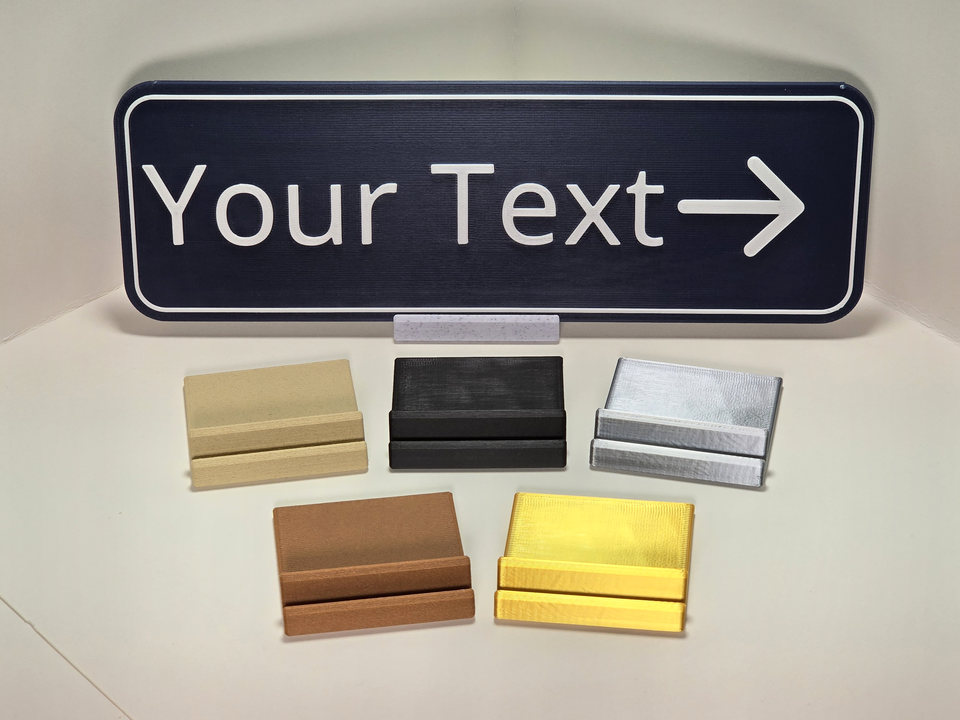
The stand has a 2 × 2-inch footprint and is 0.5 inch high. It requires no assembly: unpack it and place the compatible sign between its rails. When purchased with a sign shipment, the stand is designed to pack with the signs.
The stand is selected and purchased separately; it is not automatically included with a sign. Its available color and quantity are chosen separately from the sign's mounting preparation.
Check the exact product before ordering
- Open the exact Standard Sign or Custom Sign Template.
- Choose the sign's size and other product options.
- Review the mounting preparations available for that configuration.
- Decide whether a separate tabletop stand is needed.
- Arrange suitable installation hardware or an installer when the sign will attach to a surface.
Read Production & Installation for the current mounting-preparation, installation-responsibility, and care information.
Permanent-room and accessible signs need a separate placement check
Display choice and accessibility requirements are separate decisions. Federal standards distinguish signs identifying permanent rooms and spaces from directional and informational signs. Tactile signs can have specific height, door-location, clear-floor-space, and door-swing requirements.
Do not treat a tabletop location or a convenient wall position as proof that a required sign is correctly placed. Start with ADA Sign Information and confirm the requirements for the building and jurisdiction. The U.S. Access Board's Chapter 7 guidance is the primary federal reference used by AUP for this general distinction.